

Filmora is an innovative video editing software made for creators of all skill levels. It is designed to cater to beginners while also enabling them to make professional-looking videos with its intuitive interface and robust features. One of the most advanced features of Filmora is the AI Sticker Generator, which uses state-of-the-art technology to make customized stickers out of your pictures or video clips thus allowing you to add a personal touch to the footage.
This article discusses how to fine-tune Filmora’s AI Sticker Generator for personalized sticker creation. From understanding what the AI can do to successfully unique stickers, this guide covers everything.
Understanding the AI Sticker Generator
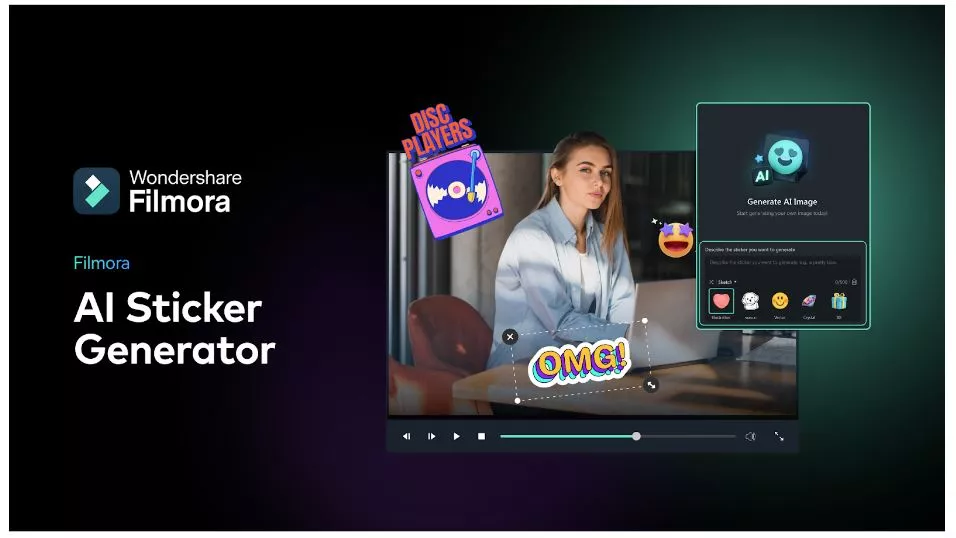
Filmora’s AI Sticker generator is a revolutionary feature that employs complex artificial intelligence algorithms to generate stickers from specified multimedia files. Whether a newbie or an experienced artist, this AI sticker generator is the best tool that will help you turn your designs into real things such as time and cost. Filmora’s free sticker generator always provides better results ranging from cartoon sticker designs to business logo stickers.
Fine-Tuning Tips and Tricks
Filmora includes an AI-driven sticker generator, enabling you to create customized stickers to fit your unique requirements. Here are some invaluable tips that can help you exploit this feature fully and get good results:
Start with Premium Media
Remember the high quality of images is important for a great-looking sticker hence the source material should be of outstanding clarity and quality. For sticker generation, choose well-lit visuals that are also clear for image or video acquisition. By doing so, amazing results will be guaranteed.
Train on Diverse Data Sets
The AI needs to see many different pictures and videos in order to learn about your preferences and style better. Use unusual subjects; present them in various colors as well as give different compositions. This helps the AI to develop a deeper understanding of aesthetics.
Make Your Results Better
Filmora offers powerful editing tools that enable the personalization of created stickers. They also allow one to fine-tune precisely the shapes, colors, or sizes of these stickers so that they match exactly what you want them to look like.
Creating Stickers that Show Your Brand
You can use the AI Sticker Generator to create custom stickers reflecting your brand, be it for your personal brand or your company. Here’s how:
Put Your Logo into Use
Use artificial intelligence to embed your unique brand logo in a variety of sticker designs.
Sync Your Paint Palette
Providing images or videos with your brand’s color combination will enable AI to generate stickers that truly resonate with your brand’s unique colors yet remain consistent in its visual identity.
Embedding Your Style
Make sure various images and videos are used in training the AI, which should reflect the particular style you want for your stickers. This could include fun, playful, and cartoonish designs as well as clean, sleek, and less elaborate themes. Giving it diverse visual styles will get you the perfect results.
Demonstrating Creativity via Customized Stickers
Filmora’s AI Sticker Generator offers endless opportunities for creating interactive and customized materials once you understand how adaptable content can be adjusted and edited. To kick-start more original ideas about using AI-generated stickers to make storytelling more exciting, add vibrant movements.
Creating Animated Stickers
Incorporate brief video clips into your designs for animated stickers that add an extra layer of involvement and dynamism to your videos and make them more interactive and visually appealing.
Transforming Emojis into Stickers
This is where emojis turn from just being regular smileys to a source of training data, thus making it possible to create different types of stickers that are highly expressive and unique.
Design Themed Stickers
Start creating sticker packs based on specific themes or occasions such as holidays, birthdays, or special events.
To unlock the full potential of Filmora’s AI Sticker Generator and produce personalized stickers that will enhance the quality of your video editing even further, this article suggests a few techniques and strategies you can use in doing so.
By reading these step-by-step explanations with some useful tips, you can take advantage of Filmora’s AI Sticker Generator fully to improve videos with customized professional-looking stickers. Whether you want to add a bit of creativity to your creative projects or align your content with visual identity guidelines for brand-building purposes, this solution provides a simple yet efficient way to generate stunning results. Therefore, immerse yourself into the world of Filmora’s AI Sticker Generator to advance your video editing skills
FAQ
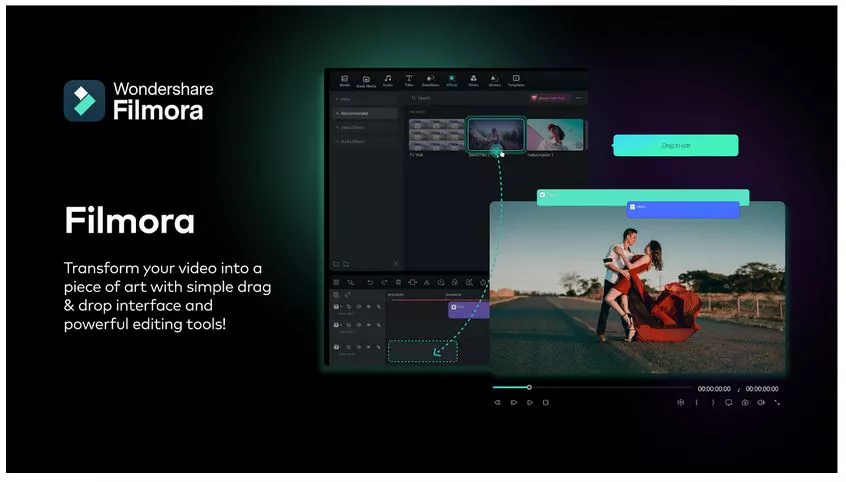
How do I add stickers to Filmora?
- Find the Sticker Maker
- Open your Filmora project and look for a tab called "Elements" (it might be on the left side). Inside Elements, you'll find the Sticker Maker.
- Pick a Picture or Video
- Choose an image or short video clip that you want to turn into a sticker. It could be anything, like a funny face, a cool logo, or even a short animation.
- Drag and Drop It
After you have selected the image or video you want to use, all you need to do is drag and drop it from your computer files directly onto the Sticker Maker. Filmora will then automatically process the file and create a custom sticker for you!
Customize Your Sticker (Optional)
Double-click your sticker to open up some editing options. You can change its size, how transparent it is, or even how it blends in with your video.
That's it! Now you've got your very own custom sticker to add to your video. You can drag and drop it wherever you want it to appear and even make copies of it to use throughout your project.
Filmora is an innovative video editing software made for creators of all skill levels. It is designed to cater to beginners while also enabling them to make professional-looking videos with its intuitive interface and robust features. One of the most advanced features of Filmora is the AI Sticker Generator, which uses state-of-the-art technology to make customized stickers out of your pictures or video clips thus allowing you to add a personal touch to the footage.
This article discusses how to fine-tune Filmora’s AI Sticker Generator for personalized sticker creation. From understanding what the AI can do to successfully unique stickers, this guide covers everything.
Comments
Log in or sign up to join the conversation.