
Here's a number most founders never look at: how much revenue quietly disappears every month because an OTP simply never arrived. Not a failed payment, not cart abandonment in the usual sense — just a boring, invisible delivery failure.
A user signs up, enters their number, and waits. The SMS takes 40 seconds instead of 5, or it never shows up at all. They refresh, try again, maybe hit resend, and eventually just close the tab. On your dashboard, this doesn't register as "OTP failed." It shows up as "incomplete registration" — the real cause buried somewhere in the funnel.
Industry estimates put SMS OTP delivery rates at roughly 70-85% globally. That means out of every 100 people trying to verify themselves, 15 to 30 fail on the first attempt. If a business is onboarding 10,000 users a month and even a fraction of that OTP friction turns into abandonment, the lifetime value walking out the door adds up fast — and it happens silently.
This is exactly why WhatsApp Authentication has moved from "nice-to-have" to something closer to a revenue protection strategy in 2026.
What Is WhatsApp Authentication?
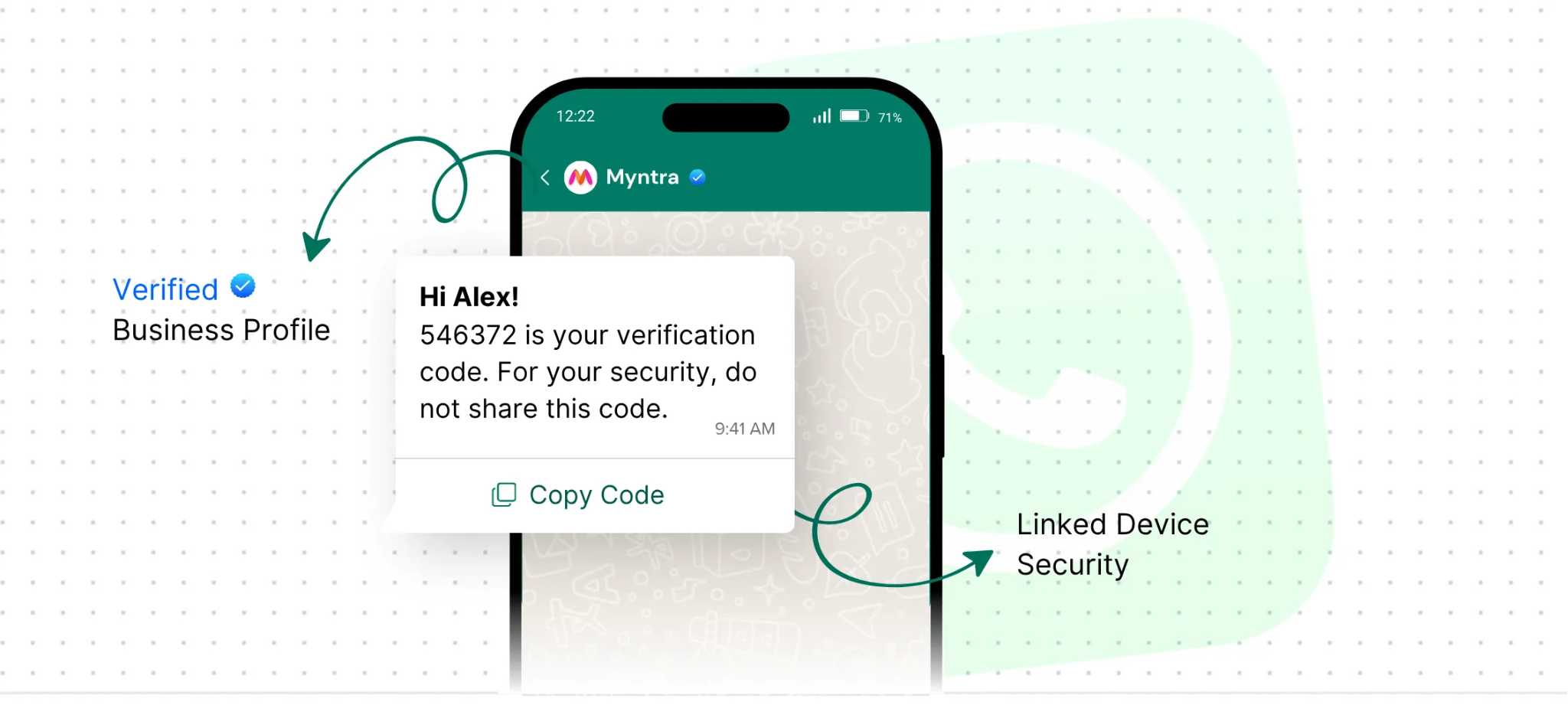
At its core, WhatsApp Authentication is a way of verifying a user's identity by sending a one-time password (or similar verification prompt) through WhatsApp instead of traditional SMS. It runs on the WhatsApp Business API, which sends pre-approved, structured message templates directly to a user's WhatsApp number.
What makes this different from SMS isn't just the delivery channel — it's the context that comes with it. The message arrives from a verified business account, complete with a name, profile photo, and often a blue tick. There's no "who is this number?" hesitation, no phishing anxiety. The Business API also brings read receipts and richer formatting, so businesses can see exactly when a code was opened, and users get a clearly formatted message with the OTP, instructions, and expiry time laid out plainly.
This isn't limited to plain OTPs either. The same infrastructure powers login verification, transaction approvals, account recovery, two-factor authentication, and flagging logins from unfamiliar devices.
How the Verification Flow Actually Works
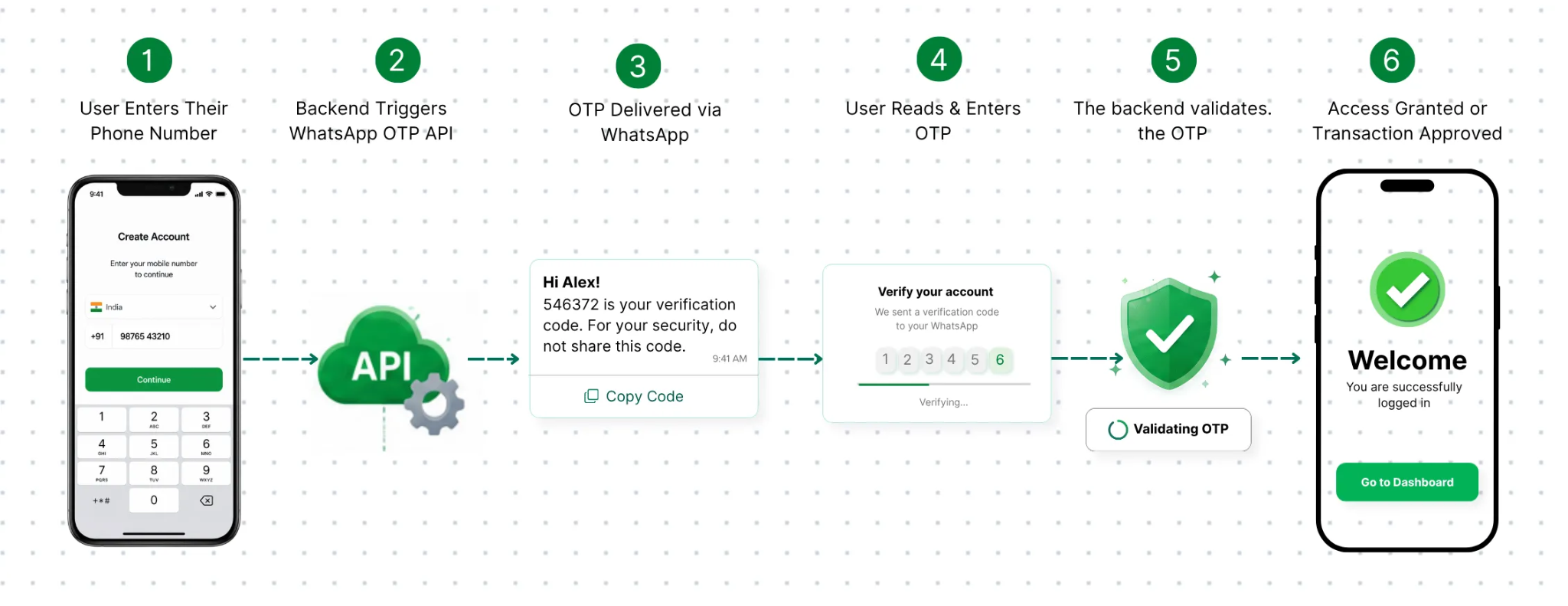
User enter their phone number on a signup, login, or checkout screen.
The backend calls the WhatsApp OTP API, usually through a Business Solution Provider (BSP), specifying the approved template and generating a time-bound code.
The OTP lands on WhatsApp, typically within 3-5 seconds, sent from the verified business account with the code and expiry clearly stated.
The user reads and enters the code — since WhatsApp notifications are high priority and familiar, this usually happens almost instantly.
The backend validates the OTP, checking it against expiry and reuse rules.
Access is granted or the transaction is approved.
A well-built system also includes an automatic SMS fallback: if the WhatsApp message doesn't deliver or isn't opened within a set window, the system quietly switches to SMS so no user gets stuck.
Why Businesses Are Making the Switch
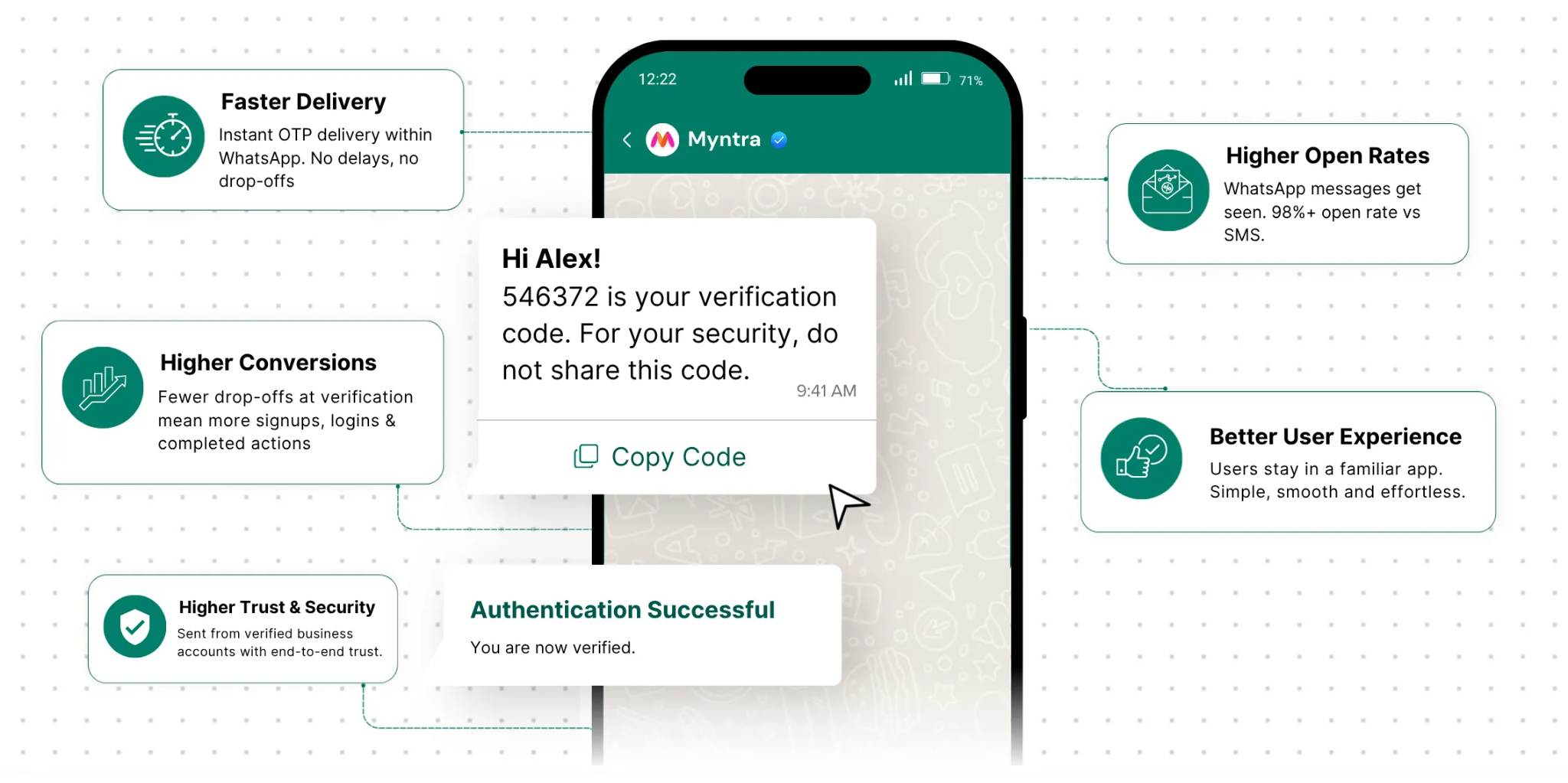
A handful of numbers explain most of this shift. WhatsApp messages see open rates around 98%, compared to 85-90% for SMS and barely 25-30% for email. More importantly, they're typically opened within 90 seconds — which matters a lot when your OTP has a 10-minute expiry window.
Delivery itself is also more dependable. SMS routes through carrier networks that can get congested or throttled by regulatory systems like India's DLT framework. WhatsApp runs over internet data, sidestepping that infrastructure entirely, which shows up clearly during high-traffic periods.
There's also a trust dimension that's easy to underestimate. A verified, branded WhatsApp message feels fundamentally different from an SMS sent from a random alphanumeric sender ID — something users have learned to be wary of. And because WhatsApp OTPs are tied to a device-level account rather than just a SIM card, they're harder to intercept through SIM-swap or SS7-style attacks, which meaningfully lowers fraud exposure compared to SMS.
WhatsApp vs SMS OTP: A Quick Comparison
Factor | WhatsApp Authentication | SMS OTP |
Delivery Rate | 95-99% | 70-85% |
Delivery Speed | 2-5 seconds | 5-60 seconds |
Open Rate | ~98% | ~85-90% |
User Trust | High (verified account) | Medium |
Fallback Option | SMS available | None |
Cost | Slightly higher | Lower |
Cost is really the only place SMS wins outright. Once you account for failed deliveries and the users lost because of them, WhatsApp tends to come out ahead on overall return per verification attempt.
The Business Case, In Plain Terms
Faster, more reliable OTP delivery translates directly into higher registration completion and fewer people abandoning signup, checkout, or login screens. It also shapes first impressions — a verified, branded message at the very first touchpoint signals legitimacy in a way an SMS from an unknown ID simply can't. In categories where most competitors still rely on SMS, switching to WhatsApp becomes a quiet but real differentiator.
Where This Is Being Used
E-commerce platforms use it for both login and checkout OTPs, where even small friction reductions can meaningfully cut cart abandonment. Banking and fintech apps lean on it as a second-factor layer for transfers and payee additions, where a failed OTP doesn't just annoy a user — it erodes trust in the platform's security. Healthcare apps use it to smooth login for appointment booking and telemedicine, which matters especially for less tech-comfortable users. EdTech platforms benefit during admission or sale seasons, when SMS systems often buckle under traffic spikes that WhatsApp's internet-based delivery handles more gracefully.
SaaS companies use it not only for onboarding but also for re-authentication — confirming identity before a user changes billing details or invites a new team member. Travel and hospitality platforms apply it at booking, check-in, and cancellation, moments of genuine user anxiety where a smooth OTP reduces both drop-off and support tickets. And in logistics, it's used for driver and delivery confirmation, creating a time-stamped record that works even in areas with patchy cellular coverage but decent data connectivity.
Common Challenges — and How They're Solved
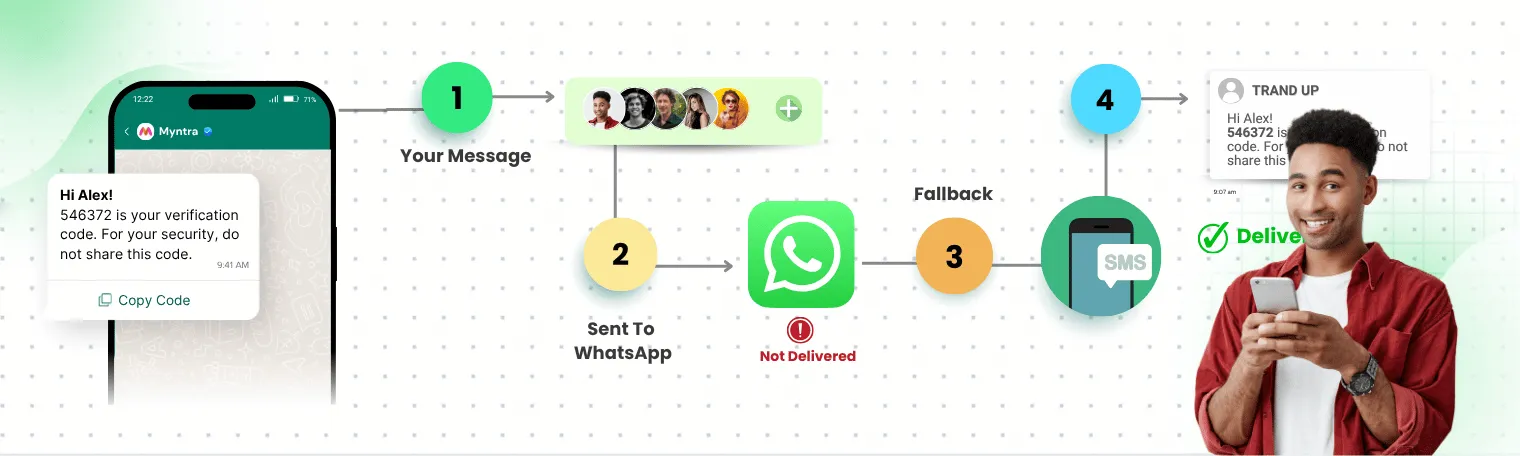
Delivery sometimes fails. The fix is a defined fallback window (usually 30-60 seconds) after which the system automatically sends an SMS OTP instead.
Not every user is on WhatsApp. The solution isn't to force it — keep WhatsApp as the default option but always offer SMS as a visible alternative.
API integration feels complicated. Getting direct access from Meta involves business verification and template approval, which can be confusing for first-timers. Working with an established BSP typically shortens this from weeks to days.
Compliance requirements vary by region. Templates should clearly state the business name, purpose, and expiry window, and authentication templates should never be mixed with marketing content. A good BSP partner helps structure this correctly from the start.
Best Practices Worth Following
Keep the OTP message short — the code, the business name, and the expiry time, nothing more. Always use pre-approved, clearly branded templates. Set an explicit expiry ("expires in 10 minutes") to remove ambiguity. Never launch without an SMS fallback configured, since even excellent delivery rates will hit edge cases. Actively monitor delivery and read receipts — unlike SMS, these give early warning signs if something's off with a template or routing path. Test across different devices and WhatsApp versions before going live, and don't neglect the OTP entry screen itself — auto-focus fields and visible countdown timers make a real difference to completion rates.
Where This Is Headed
Passwordless login is becoming the norm, and WhatsApp OTP fits naturally into that shift — a phone number and a WhatsApp code replacing the need for a password entirely. Layered on top of that, behavioral signals like typing patterns, device location, and session timing are increasingly running in the background as a second, quieter layer of verification alongside the explicit OTP check.
There's also a regulatory tailwind. Frameworks like the EU's PSD2 and India's push for stronger two-factor authentication both favor verification tied to a device-linked account over a basic SIM-based SMS. And with WhatsApp Flows expanding what's possible inside a chat window, in-app verification forms that never require leaving WhatsApp at all are likely to become common in the near future.
Summary
This guide walked through what WhatsApp Authentication actually is, how the verification flow works end to end, and why delivery speed, open rates, and trust make it a meaningfully stronger option than SMS OTP for most businesses. We compared the two side by side, looked at where WhatsApp Authentication is already proving valuable — e-commerce, fintech, healthcare, EdTech, SaaS, travel, and logistics — and covered the common challenges (delivery failures, non-WhatsApp users, integration complexity, compliance) along with practical fixes for each.
We also touched on best practices that separate a smooth rollout from a shaky one, and where the space is heading: passwordless login, behavioral verification layered on top of OTPs, and native in-chat verification through WhatsApp Flows. The bigger takeaway is simple — WhatsApp Authentication isn't just a faster OTP. For a lot of products, it's becoming the entry point to a more reliable, more trusted relationship with users from the very first interaction.
FAQs
1. How is WhatsApp Authentication different from a regular SMS OTP?
WhatsApp Authentication travels over internet data through a verified business account, making it faster and more reliable than SMS, which depends on carrier networks that can get congested or delayed.
2. What happens if a user doesn't have WhatsApp?
A properly built system automatically falls back to SMS if the WhatsApp OTP isn't delivered or opened within a set time window, so no user gets locked out.
3. How long does it take to set up WhatsApp Authentication?
With an established BSP partner, the process from initial setup to sending a live OTP typically takes 3 to 7 business days, with template approval usually completed within 24-48 hours.
4. Is WhatsApp Authentication actually more secure than SMS?
Generally yes — since it's tied to a device-level WhatsApp account rather than just a SIM card, it's harder for attackers to intercept through SIM-swap or similar exploits that commonly target SMS OTPs.
5. Is this only useful for large companies?
No. Any business that wants faster, more trustworthy user verification can benefit — from early-stage startups to large enterprise platforms, across e-commerce, SaaS, fintech, and healthcare alike.
Comments
Log in or sign up to join the conversation.