
Managing a truck repair shop involves much more than fixing vehicles. Shop owners and managers need to schedule repairs, track parts, communicate with customers, manage technicians, create invoices, and monitor business performance. Handling these tasks manually can lead to delays, paperwork errors, missed appointments, and lost revenue.
Truck repair shop software helps repair businesses centralize these operations in one digital platform. From work orders and inspections to inventory and billing, the right software can make everyday shop management faster, more organized, and more efficient.
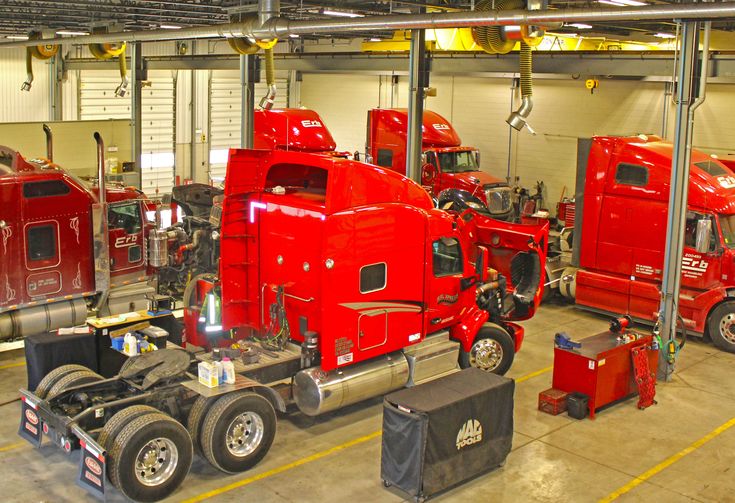
What Is Truck Repair Shop Software?
Truck repair shop software is a digital management solution designed specifically for businesses that service commercial trucks, heavy-duty vehicles, fleets, and other large vehicles. It brings important shop operations into one system instead of requiring technicians and managers to rely on spreadsheets, paper records, or disconnected applications.
Depending on the platform, features may include work order management, repair estimates, digital inspections, inventory tracking, technician management, customer communication, invoicing, reporting, and maintenance history.
Why Do Truck Repair Shops Need Specialized Software?
Truck repair businesses have different requirements than typical automotive repair shops. Commercial trucks often require more complex repairs, specialized parts, detailed inspections, and accurate service documentation.
A dedicated software solution can help shops:
Organize repair orders
Track vehicle service history
Manage technician assignments
Monitor parts and inventory
Create estimates and invoices
Improve customer communication
Reduce administrative work
Track shop performance
Manage fleet maintenance
Keep repair records organized
By automating repetitive administrative processes, technicians and managers can spend more time focusing on repairs and customer service.
Key Features of Truck Repair Shop Software
1. Work Order Management
Work orders are at the center of most repair shop operations. Software allows managers to create, update, and track work orders digitally.
A centralized work order system can show the vehicle being repaired, customer information, reported problems, recommended services, assigned technicians, parts used, labor, and repair status. This makes it easier for everyone in the shop to understand what needs to be done.
2. Digital Vehicle Inspections
Digital inspections can replace paper-based inspection forms and make vehicle assessments easier to document.
Technicians can record inspection results, add notes, and capture photos or other supporting information. Managers can then review inspection findings and use them to communicate recommended repairs to customers.
This creates a more transparent repair process while reducing the risk of lost inspection paperwork.
3. Repair Estimates
Accurate estimates help customers understand expected repair costs before work begins. Truck repair shop software can make it easier to build estimates using labor, parts, services, and other charges.
Once an estimate is prepared, shop staff can review it with the customer and move approved work into the repair workflow. This can reduce duplicate data entry and make the process more efficient.
4. Parts and Inventory Management
Parts management is particularly important for heavy-duty truck repair shops because repairs may require expensive or specialized components.
Software can help track:
Parts availability
Inventory quantities
Part costs
Vendors
Purchase orders
Parts used on work orders
Inventory movement
Better inventory visibility helps shops avoid unnecessary shortages while reducing the risk of ordering parts they already have in stock.
5. Technician Management
Managers need to know which technicians are working on which vehicles and how much time is being spent on each repair.
Truck repair software can help assign jobs, monitor labor, track technician hours, and understand productivity. This information can help managers identify workflow problems and improve shop efficiency.
6. Customer Management
Keeping customer information organized is essential for building long-term relationships.
A software system can maintain customer profiles containing contact information, vehicles, previous repairs, invoices, estimates, and service history. Having this information readily available allows employees to provide faster and more informed customer support.
7. Service History
Detailed service history gives repair shops a complete picture of a truck's previous maintenance and repair work.
Instead of searching through paper records, staff can quickly review previous services, parts replaced, inspections, and other repair information. This can help technicians make better-informed decisions when diagnosing recurring problems.
8. Invoicing and Payments
Billing is another important part of repair shop management. Software can help generate professional invoices based on completed labor, parts, taxes, and other charges.
Digital invoicing reduces manual calculations and makes it easier to keep financial records organized. Some systems can also support payment processing and payment tracking.
9. Fleet Management
Many truck repair businesses work with fleet operators who maintain multiple vehicles. Managing fleet repairs manually can become complicated as the number of vehicles increases.
Fleet-focused features can help businesses monitor vehicles, maintenance requirements, repair histories, and upcoming services from one centralized system.
This allows fleet customers and repair shops to maintain better visibility into vehicle maintenance.
10. Reporting and Business Insights
Repair shop software can turn operational information into useful business reports.
Managers may be able to track metrics such as:
Revenue
Labor sales
Parts sales
Technician productivity
Repair order volume
Average repair order value
Outstanding invoices
Inventory costs
These insights can help owners identify trends, control costs, and make better operational decisions.
Benefits of Using Truck Repair Shop Software
Improved Efficiency
Automating repetitive tasks reduces administrative workload. Employees can spend less time entering information and more time managing customers and repair operations.
Better Organization
When customer, vehicle, repair, inventory, and billing information is stored in one system, employees can access the information they need without searching through multiple files.
Fewer Errors
Manual data entry can result in incorrect parts quantities, billing mistakes, missing records, and duplicated information. A centralized system can reduce these common errors.
Faster Customer Service
Employees can quickly access repair histories, estimates, work orders, and invoices. This makes it easier to answer customer questions and provide updates.
Better Technician Productivity
Managers can assign jobs, monitor labor, and track repair progress. This helps shops identify bottlenecks and use technician time more effectively.
Increased Revenue Visibility
Accurate reporting gives owners a clearer view of sales, labor, parts, and profitability. With better information, management can make more informed business decisions.
How to Choose the Right Truck Repair Shop Software
Not every repair shop has the same needs. Before selecting a solution, consider the size of your business, the types of vehicles you service, the number of technicians, and the complexity of your workflow.
Look for software that offers:
Easy-to-use interfaces – Employees should be able to learn the system without extensive training.
Work order management – Repair orders should be easy to create, update, and track.
Digital inspections – Technicians should be able to document vehicle conditions efficiently.
Inventory tools – The system should provide visibility into parts and purchasing.
Customer management – Customer and vehicle information should be accessible in one place.
Reporting – Owners should have access to useful operational and financial insights.
Scalability – The platform should support your business as it grows.
Mobile accessibility – Technicians and managers may benefit from accessing information while working around the shop.
Integrations – Consider whether the software can connect with accounting, payment, parts, or other systems your business already uses.
Reliable support – Responsive customer support can make implementation and troubleshooting easier.
Truck Repair Software vs. Generic Business Software
Generic business management software may offer basic invoicing, customer management, or scheduling features, but it often lacks tools designed specifically for vehicle repair operations.
Truck repair shop software is built around the workflow of repair businesses. Features such as repair orders, vehicle inspections, labor tracking, service history, parts management, and fleet maintenance can make it more practical for heavy-duty repair operations.
For a truck repair shop, using specialized software can reduce the need to combine multiple general-purpose tools.
The Future of Truck Repair Shop Management
As repair businesses become more technology-driven, digital shop management is becoming increasingly important. Cloud-based platforms, mobile access, automated workflows, digital inspections, and real-time reporting can help repair shops operate more efficiently.
Businesses that replace paper-heavy processes with connected digital workflows can gain better visibility into daily operations while improving communication between managers, technicians, and customers.
The goal is not simply to automate individual tasks. The right software should connect the entire repair process—from customer intake and inspection to parts, labor, invoicing, and reporting.
Final Thoughts
Truck repair shop software can help modern repair businesses manage complex operations more efficiently. By bringing work orders, inspections, customer information, service history, inventory, technician management, billing, and reporting together, software can reduce administrative work and improve operational visibility.
When choosing a solution, focus on features that match your shop's workflow and future growth plans. A user-friendly, scalable platform can become an important part of running a more organized and productive truck repair business.
Why Choose Fullbay
Fullbay provides software designed to help heavy-duty repair shops manage their day-to-day operations more efficiently.
From repair orders and inspections to inventory, invoicing, and shop management, Fullbay helps heavy-duty repair businesses bring essential workflows together in one platform.
Comments
Log in or sign up to join the conversation.