
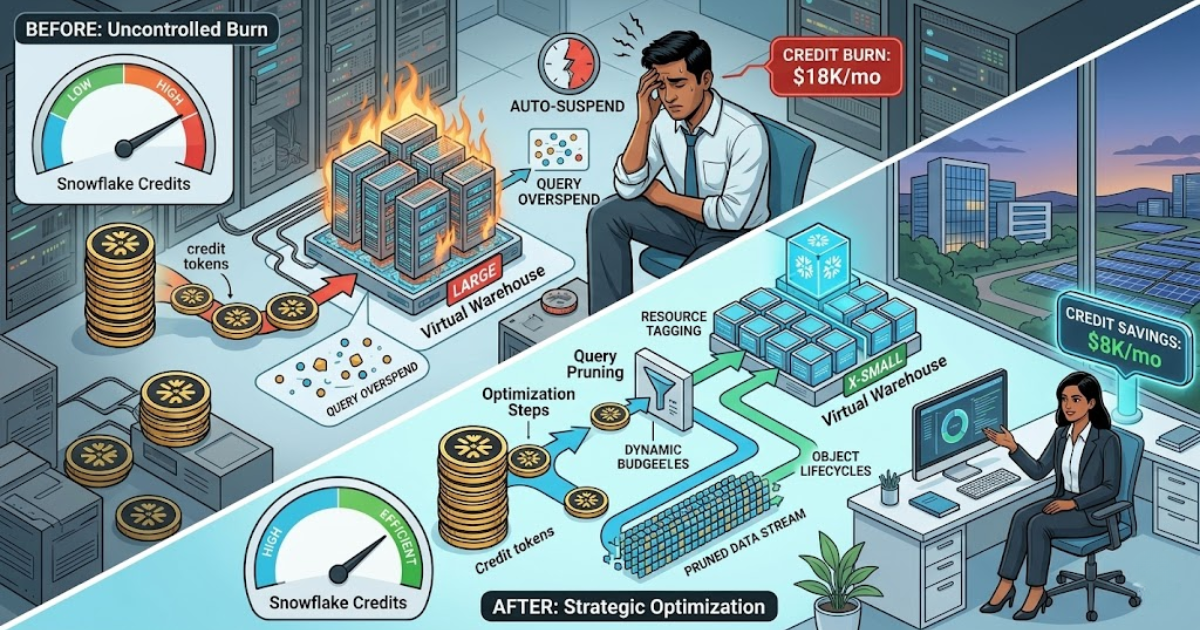
The shift to cloud data platforms has changed how enterprises manage their technology budgets. In 2026, Snowflake Data Warehousing stands as a leader in the industry. It offers a unique architecture that separates storage from compute. This flexibility provides massive power but also introduces the risk of "credit leakage." Without strict oversight, an unoptimized environment can consume an entire annual budget in months.
FinOps, or Financial Operations, is the practice of bringing financial accountability to the variable spend of the cloud. For organizations using Snowflake Data Warehousing Services, FinOps is no longer optional. It is a technical necessity.
The Architecture of Consumption
To control costs, you must first understand how Snowflake bills for its services. Unlike traditional servers, you do not pay for idle hardware. You pay for "Virtual Warehouses," which are clusters of compute resources.
1. Compute Credits
Compute is the most expensive part of the bill. Snowflake charges based on the size of the warehouse (X-Small to 6X-Large) and the duration it runs. A 4X-Large warehouse consumes credits 128 times faster than an X-Small.
2. Storage and Cloud Services
Storage is a flat monthly fee per terabyte. Cloud Services include metadata management, query parsing, and security. Snowflake only charges for Cloud Services if they exceed 10% of your daily compute usage. This makes compute optimization the primary lever for cost reduction.
Strategy 1: Right-Sizing Virtual Warehouses
The most common mistake in Snowflake Data Warehousing is using a warehouse that is too large for the task. Technical leaders often choose a "Large" warehouse for every workload to ensure speed. This leads to massive waste.
Match Size to Workload
Not every query needs a 2XL warehouse.
Small Tasks: Use X-Small or Small warehouses for data loading and simple lookups.
Complex Joins: Use Medium or Large warehouses for heavy transformations.
Large Batches: Reserve XL+ warehouses for massive, one-time historical loads.
Analyze the Query Profile
Before increasing a warehouse size, check the Query Profile in the Snowflake UI. If you see "Local Disk Spilling," the warehouse lacks enough memory for the operation. If you see "Remote Disk Spilling," the memory is severely overloaded. Only increase the size if spilling is a consistent problem. Reducing a warehouse by one size can cut your costs by 50% for that specific workload.
Strategy 2: Intelligent Auto-Suspend and Auto-Resume
Snowflake’s "Auto-Suspend" feature is the most effective tool for saving credits. It shuts down the compute cluster when no queries are running.
Set Aggressive Suspend Times
The default auto-suspend time is often 5 minutes (300 seconds). For many workloads, this is too long.
ETL Workloads: Set auto-suspend to 60 seconds. These tasks are predictable and do not need to keep the cluster "warm."
BI Dashboards: Set auto-suspend to 60 or 120 seconds. This balances cost with user experience.
Data Science: Use a longer suspend time if analysts are running frequent, iterative queries to keep the cache active.
Avoid the "Start-Stop" Trap
Snowflake bills a minimum of 60 seconds of credit every time a warehouse starts. If you set your auto-suspend to 1 second, and your queries run every 2 seconds, you will pay for a full minute of work for every single query. Always align your suspend settings with the frequency of your tasks.
Strategy 3: Mastering Multi-Cluster Warehouses
In 2026, high concurrency is a standard requirement for Snowflake Data Warehousing Services. Multi-cluster warehouses handle many users simultaneously by adding more clusters of the same size.
Use "Auto-Scale" Mode
Auto-scale allows Snowflake to add and remove clusters automatically based on demand. Set a "Minimum Cluster Count" of 1 and a "Maximum Cluster Count" based on your peak user load. This ensures you only pay for extra compute during the busiest hours of the day.
Choose the Right Scaling Policy
Standard Policy: Adds clusters quickly to minimize queuing. Use this for executive dashboards where speed is the priority.
Economy Policy: Waits until there is enough work to keep a cluster busy for 6 minutes. Use this for background tasks where a 2-minute delay is acceptable. Switching to the Economy policy can reduce multi-cluster costs by 15% to 20%.
Strategy 4: Eliminating Inefficient SQL
Bad code is the leading cause of credit burn. A single "Cross Join" or a "Select *" on a billion-row table can cost hundreds of dollars.
Stop Using "Select *"
In a columnar database like Snowflake, you only pay to read the columns you request. Selecting all columns from a wide table forces the system to scan unnecessary data. Explicitly naming your columns can reduce query time and credit use by 30% or more.
Leverage Micro-Partitions
Snowflake stores data in micro-partitions. It uses "Pruning" to skip partitions that do not match your query filters.
Filter Early: Always use a WHERE clause on columns like DATE or REGION.
Cluster Keys: For very large tables (over 1 TB), consider using a Cluster Key on the most frequently filtered columns. This improves pruning and makes queries run faster on smaller, cheaper warehouses.
Strategy 5: Monitoring with Resource Monitors
A Resource Monitor is a technical safety net. It allows you to set hard limits on credit consumption for specific warehouses or the entire account.
Set Quotas and Alerts
Configure Resource Monitors at three levels:
Notify: Send an email when a warehouse reaches 50% of its monthly quota.
Notify & Suspend: Suspend the warehouse at 90% and allow existing queries to finish.
Notify & Suspend Immediate: Shut down everything at 100%, even if queries are still running.
Industry data from 2025 shows that companies using Resource Monitors experience 25% fewer "budget surprises." These monitors prevent a "Runaway Query" from burning through thousands of credits overnight.
Strategy 6: Utilizing Search Optimization and Materialized Views
Performance tuning often costs credits upfront but saves them in the long run.
Search Optimization Service (SOS)
SOS is a background service that speeds up "Point Lookup" queries (e.g., searching for a specific Email or ID). It carries a maintenance cost. Only use SOS on large tables (over 100 GB) where users frequently search for single values. This prevents the need for massive warehouses just to find a single row.
Materialized Views
Materialized views store the pre-computed results of a query. They are expensive to maintain because they update every time the source data changes. Use them for tables that are queried thousands of times per day but update only once per day. This "Trade-Off" replaces thousands of expensive compute cycles with a single, small maintenance cost.
Strategy 7: Controlling Data Egress and Transfer
While compute is the main cost, data movement is not free. Moving data between cloud regions or out of the Snowflake environment incurs "Egress" charges.
Stay in the Same Region
Ensure your BI tools, ETL pipelines, and data warehouses live in the same cloud region (e.g., AWS US-East-1). Transferring data between regions can add 5% to 10% to your total bill.
Use Zero-Copy Cloning
One of the most powerful features of Snowflake Data Warehousing Services is Zero-Copy Cloning. You can clone a 10 TB production database for testing in seconds. The clone takes up zero additional storage space. You only pay for the credits used to run the dev warehouse and for any data you change in the clone. This eliminates the need for expensive, time-consuming data duplication processes.
Quantitative Impact of FinOps Strategies
Implementing these technical strategies leads to significant financial returns.
Optimization Tactic | Average Credit Reduction | Implementation Difficulty |
Warehouse Right-Sizing | 30% - 50% | Medium |
Auto-Suspend Tuning | 10% - 15% | Low |
Multi-Cluster Economy Policy | 15% - 20% | Low |
SQL Query Pruning | 20% - 40% | High |
Resource Monitors | 100% (Prevents Surprises) | Low |
Real-World Example: FinTech Efficiency
A mid-sized FinTech firm in 2025 saw their Snowflake bill grow by 20% every month. They had no visibility into who was spending the credits. They implemented a FinOps framework:
They tagged every warehouse by the Department..
They moved their dev teams to X-Small warehouses with a 60-second auto-suspend.
They identified a single recurring query that lacked a date filter.
The Result: Their monthly credit burn dropped by 42% in just 30 days. They maintained this level of efficiency even as their data volume doubled over the next year.
Establishing a FinOps Culture
Technical settings are only half the battle. You must also establish a culture of cost-awareness among your data engineers and analysts.
Use Cost Attribution Tags
Apply tags to every warehouse. Tag them by Project, Team, or Product. This allows you to see exactly which department is driving the bill. In Snowflake Data Warehousing, "What you can't see, you can't save."
Weekly "Burn" Reviews
Hold a 15-minute meeting every week to review the top 10 most expensive queries. Use the QUERY_HISTORY and WAREHOUSE_METERING_HISTORY views to identify anomalies. This keeps the team focused on efficiency and prevents bad habits from becoming permanent.
The Future: AI-Driven FinOps in 2026
We are entering the era of "Autonomous FinOps." New tools in the Snowflake ecosystem now use machine learning to predict your credit usage.
Predictive Scaling: The system analyzes historical traffic to spin up warehouses before the morning rush.
Auto-Optimization Agents: AI agents suggest specific SQL rewrites to improve pruning.
Anomaly Detection: The system flags a query that is taking 5x longer than usual and alerts the admin in real-time.
By leveraging these AI-driven Snowflake Data Warehousing Services, companies are moving from "Reactive" cost management to "Proactive" profit protection.
Conclusion
Snowflake provides incredible power for the modern enterprise. However, that power must be managed with technical rigor. Snowflake Data Warehousing is a variable-cost engine. If you do not steer it, it will drive your budget off a cliff.
By implementing right-sizing, aggressive auto-suspend, and efficient SQL practices, you protect your margins. Professional Snowflake Data Warehousing Services focus on this balance between performance and price. In the competitive market of 2026, the companies that thrive are not just those with the most data. They are those who process that data with the highest financial efficiency. FinOps is the technical bridge between big data and big profits. Start optimizing today to ensure your data cloud remains an asset, not a liability.
Comments
Log in or sign up to join the conversation.