
Managing a large Outlook PST file can become difficult when the file grows too large, Outlook performance slows down, or you need to organize email data for migration and backup. A practical solution is to split the PST file into smaller, manageable parts based on size, date, year, folder, sender, subject, or other criteria.
Shefware PST Split Tool is designed to simplify this process while maintaining the original Outlook email hierarchy and metadata.
Why Split a Large PST File?
Large PST files can make Outlook data management more complicated. Splitting a PST file into smaller files can help you:
Organize emails and Outlook data more efficiently
Create smaller PST files for migration
Manage email archives more easily
Create manageable backup files
Separate data by date, year, sender, folder, or size
Improve the manageability of large Outlook archives
Instead of manually moving thousands of emails, a dedicated PST splitter can automate the process according to your selected criteria.
Shefware PST Split Tool
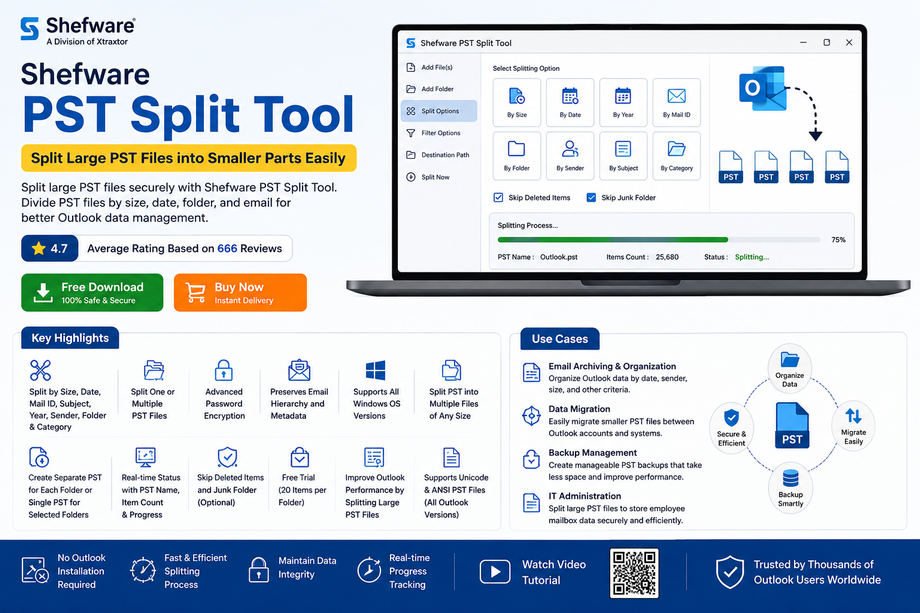
Shefware PST Split Tool is a Windows-based utility for dividing large PST files into multiple smaller PST files. It supports both Unicode and ANSI PST files and provides multiple splitting options for flexible Outlook data management.
The software can split one or multiple PST files based on:
Size
Date
Year
Mail ID
Folder
Sender
Subject
Category
It also allows users to select specific folders and decide whether to create separate PST files or consolidate selected folder data into a single PST.
Key Features
Multiple Splitting Options: Split PST files according to size, date, year, sender, subject, folder, category, or Mail ID.
Batch PST Splitting: Process one or multiple PST files in a single workflow.
No Outlook Installation Required: Split PST files without requiring Microsoft Outlook to be installed.
Preserve Outlook Data: Maintain email hierarchy and important metadata during the splitting process.
Password Protection: Work with password-protected PST files and use password encryption to protect output data.
Real-Time Process Status: Monitor PST names, item counts, and processing status while splitting.
High-Volume PST Support: Divide large PST files into multiple smaller PST files regardless of their original size.
Selective Folder Splitting: Select specific folders and create separate PST files or a consolidated PST file according to your requirements.
Free Trial: Evaluate the software with the demo version, which supports up to 20 items per folder.
What Outlook Data Can Be Preserved?
The PST Split Tool is designed to retain important Outlook data, including:
Emails
Received emails
Sent emails
Drafts
Junk folders
Attachments
Hyperlinks
Email Headers
From
To
Date
Subject
Calendars
Events
Meetings
Locations
Contacts
Full names
Phone numbers
Primary email addresses
This makes the tool useful when you need to reorganize large Outlook archives without manually separating individual items.
Common Use Cases
1. Email Archiving
Organizations and individuals can divide large Outlook archives by year, date, sender, folder, or size to make historical email data easier to manage.
2. PST Data Migration
Smaller PST files can be easier to manage when transferring Outlook data between systems, accounts, or environments.
3. Backup Management
Splitting a large PST into multiple smaller files can make backup storage and archive organization more manageable.
4. IT Administration
IT administrators can divide employee mailbox archives into smaller PST files for organized storage and easier administration.
How to Split a Large PST File
The process is designed to be straightforward.
Step 1: Add PST Files
Launch Shefware PST Split Tool and select Add Files or Add Folder. Choose the PST files you want to process and select a destination folder for the output.
Step 2: Select a Splitting Method
Choose the appropriate filter based on your requirement:
By Date
By Year
By Size
By Mail ID
By Folder
By Sender
By Subject
By Category
Step 3: Split and Verify
Click Split to begin processing. The software displays the process status, including PST name and item count. After completion, open the destination location and verify the newly created PST files.
Secure PST File Management
When working with Outlook archives, protecting email data is important. Shefware PST Split Tool provides password encryption features and processes files without requiring manual transfer of the source data.
The tool is intended to help users create smaller, more manageable PST files while reducing the complexity of handling large Outlook archives.
Why Choose Shefware PST Split Tool?
Shefware PST Split Tool combines multiple splitting methods with practical Outlook data-management features.
Key advantages include:
Multiple PST splitting criteria
Batch processing
Unicode and ANSI PST support
No Outlook installation required
Password-protected PST support
Selective folder processing
Real-time splitting status
Email and attachment preservation
Free trial available
Windows compatibility
Whether you are an individual Outlook user, IT administrator, or organization managing large email archives, the software provides a structured way to divide large PST files into smaller parts.
Final Thoughts
A large PST file doesn't have to make Outlook data management complicated. With the right PST splitting solution, you can divide large archives according to size, date, year, folder, sender, subject, category, or Mail ID and create smaller files that are easier to manage.
Shefware PST Split Tool provides a practical approach to PST splitting with batch processing, selective filters, password protection, and support for both ANSI and Unicode PST files.
🚀 Try Shefware PST Split Tool
Want to split a large PST file into smaller, manageable parts?
Download the free demo and evaluate the PST splitting features today.
Download Shefware PST Split Tool
For users ready for the full version:
Frequently Asked Questions
1. What is a PST Split Tool?
A PST Split Tool is software designed to divide a large Outlook PST file into multiple smaller PST files based on selected criteria such as size, date, year, folder, sender, or subject.
2. Can Shefware PST Split Tool split a PST by size?
Yes. The software provides a By Size option for dividing a large PST file into smaller files.
3. Can I split PST files by date or year?
Yes. You can split PST data using date or year-based filters to organize historical Outlook data.
4. Can I split multiple PST files at once?
Yes. Shefware PST Split Tool supports processing one or multiple PST files.
5. Does the software require Microsoft Outlook?
No. According to the provided product information, the tool can split PST files without Outlook installation.
6. Does it support password-protected PST files?
Yes. The software supports working with password-protected PST files and provides password encryption capabilities.
7. Can I split only a specific Outlook folder?
Yes. The tool provides folder-based splitting and allows users to select folders according to their requirements.
8. What PST formats are supported?
The tool supports both Unicode and ANSI PST files, regardless of Outlook version.
9. Is there a free trial?
Yes. The demo version allows users to evaluate the software with a limit of 20 items per folder.
10. Who can use PST Split Tool?
It can be useful for individual Outlook users, IT administrators, organizations, and anyone who needs to organize, migrate, archive, or manage large PST files.
Comments
Log in or sign up to join the conversation.