
Quality control is one of the most important parts of any construction project. From residential buildings and commercial properties to large infrastructure developments, construction teams must ensure that every stage of work meets project specifications, safety requirements, and quality standards.
However, managing inspections manually can become difficult as projects grow. Paper checklists, spreadsheets, emails, photographs, and separate documents can make it challenging to track defects and follow up on corrective actions.

Modern digital solutions are helping construction companies simplify these processes. Building Inspection Software provides a centralized platform where inspectors and project teams can record findings, assign tasks, monitor progress, and maintain detailed inspection records.
When combined with quality assurance and defect management tools, digital inspection technology can create a more organized approach to construction quality control.
What Is Building Inspection Software?
Building Inspection Software is a digital solution designed to help construction professionals conduct, document, and manage inspections throughout a project's lifecycle.
Instead of completing paper forms and manually transferring information into spreadsheets, inspectors can use smartphones or tablets to record findings directly from the job site.
An inspection record may include descriptions, photographs, locations, checklists, comments, priority levels, and corrective actions. This information can then be shared with project managers, contractors, supervisors, and other relevant stakeholders.
The main advantage is that inspection information becomes easier to access and manage. Teams can quickly identify outstanding issues without searching through multiple files or folders.
Why Digital Inspections Matter in Construction
Construction projects involve many moving parts. Different contractors may be working simultaneously, while inspectors need to verify that completed work meets the required standards.
Manual inspection methods can lead to several problems, including lost paperwork, duplicated information, delayed communication, and difficulty tracking unresolved issues.
Digital inspection systems provide a more structured workflow.
An inspector can identify a problem, document it with photographs, assign responsibility, and establish a deadline. The responsible team can then address the issue and provide evidence of completion.
This creates a clear process from inspection to resolution.
Supporting Quality Assurance With Digital Tools
Quality assurance involves more than identifying defects after they occur. It also involves establishing processes that help prevent problems and maintain consistent standards throughout construction.
Quality Assurance Inspection Software can help organizations standardize inspection procedures across different projects and locations.
Teams can create digital checklists based on specific construction activities. For example, separate checklists can be developed for electrical work, plumbing, concrete, structural elements, finishing, safety requirements, or final inspections.
Using standardized checklists helps inspectors follow consistent procedures.
It can also make it easier for management to compare inspection results across different teams or projects and identify areas where quality processes may need improvement.
How Construction QA Software Improves Project Visibility
Construction QA Software can bring inspection information into one centralized system.
Project managers often need to understand what is happening across a construction site without physically visiting every location. A digital dashboard can provide visibility into inspection activities, outstanding issues, completed tasks, and areas requiring attention.
This can be particularly useful for large projects where multiple buildings, floors, units, or work zones are being inspected.
Instead of waiting for weekly reports, management can access updated information and respond to problems more quickly.
Better visibility can also help project teams prioritize their efforts. Critical issues can receive immediate attention, while lower-priority items can be scheduled according to project requirements.
Managing Construction Defects More Efficiently
Defects are an unavoidable concern in construction, but poor defect tracking can make them more difficult and expensive to resolve.
Defects Management Software helps teams create a structured process for identifying, assigning, monitoring, and closing defects.
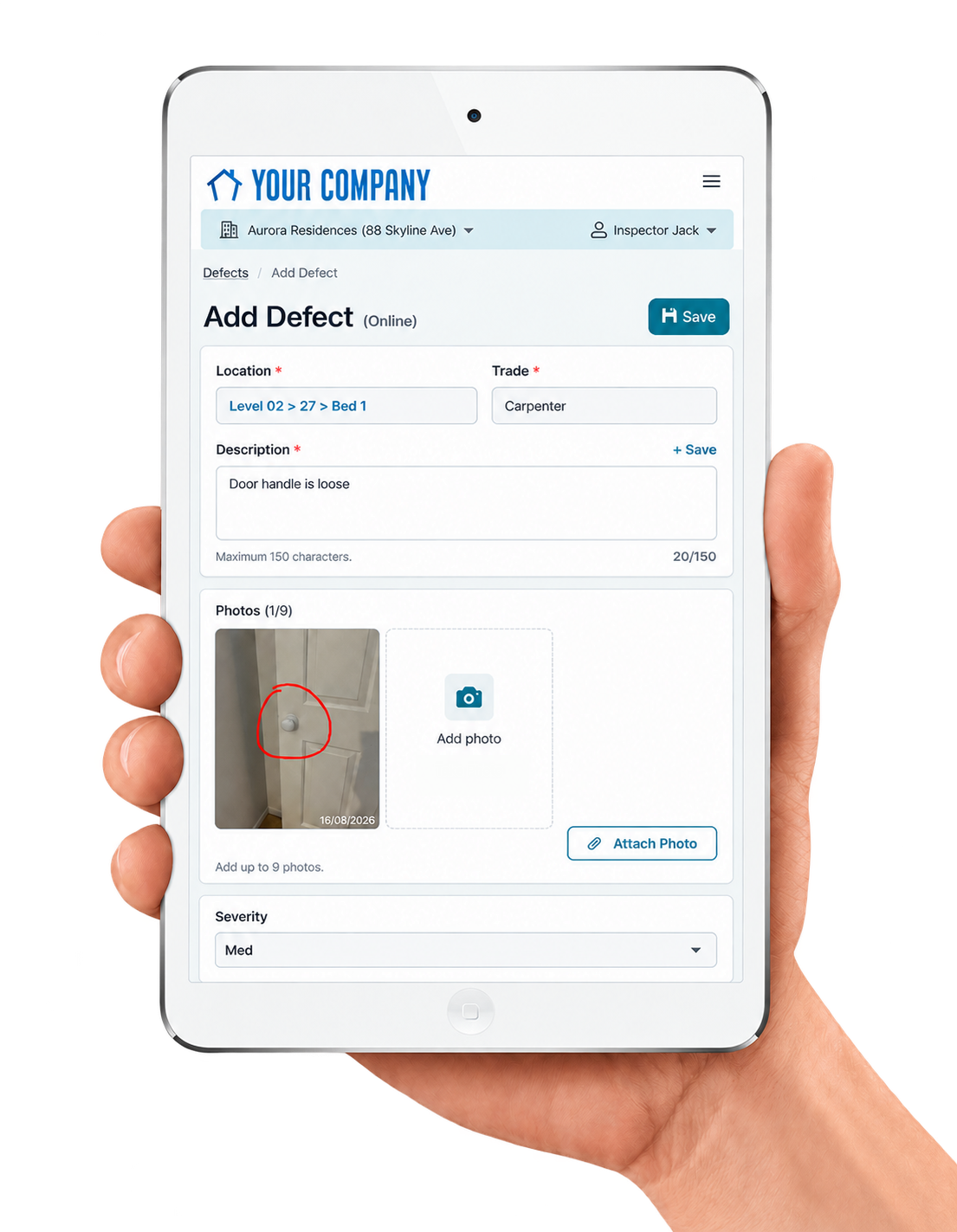
For example, an inspector may discover an incorrectly installed fixture during a routine inspection. The issue can be recorded digitally with a photograph and description. It can then be assigned to the appropriate contractor with a target completion date.
Once the contractor completes the repair, the status can be updated and supporting evidence can be added.
The inspector or supervisor can then review the work and close the defect when it meets the required standard.
This creates accountability while reducing the risk of unresolved problems being overlooked.
The Importance of a Construction Punch List
Near the end of a construction project, teams typically create a punch list containing unfinished work, defects, and items requiring correction before completion or handover.
Traditionally, punch lists may be managed using spreadsheets or printed documents. These methods can become difficult to maintain when hundreds of items are involved.
A Construction Punch List App allows teams to manage punch list activities directly from mobile devices.
Inspectors can walk through a property, identify an issue, take a photograph, and create a punch list item immediately. Each item can contain relevant details such as location, description, responsible contractor, priority, and status.
This makes the punch list a live working document rather than a static spreadsheet.
Mobile Access for On-Site Inspection Teams
Construction inspections happen in the field, so mobile access is an important feature of modern inspection technology.
Inspectors should be able to record information without returning to an office or carrying large amounts of paperwork around the site.
With a mobile inspection application, information can be entered while the inspector is physically viewing the work.
Photographs can be attached to inspection records, comments can be added immediately, and issues can be assigned without unnecessary delays.
This can significantly improve the speed and accuracy of communication between field teams and project management.
Photographs and Visual Evidence
A written description may not always be enough to explain a construction defect.
For example, saying that a wall has finishing damage provides limited information. A photograph can immediately show the location, severity, and nature of the problem.
Modern inspection platforms allow teams to attach photographs and other supporting documents to inspection records.
Visual evidence can help contractors understand what needs to be corrected and can also provide documentation of the condition before and after corrective work.
This makes inspection records more useful for project tracking and future reference.
Assigning Responsibility for Defects
One of the common challenges with manual defect management is determining who is responsible for fixing an issue.
Digital systems can make responsibility much clearer.
When an inspection issue is created, it can be assigned to a particular contractor, subcontractor, department, or team member. The assigned person can then receive the relevant information and understand what action is expected.
Managers can monitor whether tasks are progressing and identify overdue items.
Clear responsibility helps create accountability and can reduce delays caused by uncertainty about who should address a particular problem.
Improving Communication Between Stakeholders
Construction projects involve developers, architects, engineers, contractors, subcontractors, inspectors, and clients. Poor communication between these groups can result in delays and misunderstandings.
Digital inspection platforms provide a shared source of information.
Rather than exchanging multiple emails containing photographs and spreadsheets, stakeholders can work from centralized inspection records.
When everyone has access to the latest information, it becomes easier to understand which issues remain open, which have been completed, and which are waiting for verification.
Using Inspection Data to Identify Recurring Problems
Inspection software can do more than manage individual defects. Over time, inspection data can reveal patterns.
For example, if similar defects repeatedly appear in the same type of installation, management can investigate why the issue occurs.
The underlying problem may involve materials, installation procedures, training, supervision, or communication.
By analyzing recurring issues, construction companies can take preventive action instead of simply correcting the same problem repeatedly.
This supports a continuous improvement approach to quality management.
Creating Better Construction Documentation
Accurate documentation is an important part of project management. Inspection records can provide evidence of completed inspections, identified defects, corrective actions, and approvals.
Digital records are generally easier to organize and retrieve than large collections of paper documents.
Project teams can maintain inspection histories throughout the project and refer back to them when needed.
This can be especially useful during final handover, maintenance activities, or internal quality reviews.
Choosing the Right Inspection Solution
Every construction company has different requirements, so it is important to choose software that matches the organization's workflow.
Useful capabilities may include mobile inspections, customizable checklists, photo attachments, task assignments, notifications, dashboards, defect tracking, reporting, and user permissions.
Ease of use should also be considered. If field teams find the software complicated, adoption can become difficult.
The best solution should make inspections simpler rather than adding another layer of administrative work.
Conclusion
Construction quality management requires continuous attention from the beginning of a project through final completion. Manual inspection processes can make it difficult to maintain accurate records, communicate defects, and track corrective actions efficiently.
Modern solutions such as Building Inspection Software, Quality Assurance Inspection Software, Construction QA Software, Defects Management Software, and a Construction Punch List App can help construction teams create a more organized and transparent quality-control workflow.
By digitizing inspections, centralizing defect information, improving communication, and providing real-time visibility, construction companies can respond to issues more efficiently and maintain better project documentation.
Comments
Log in or sign up to join the conversation.