

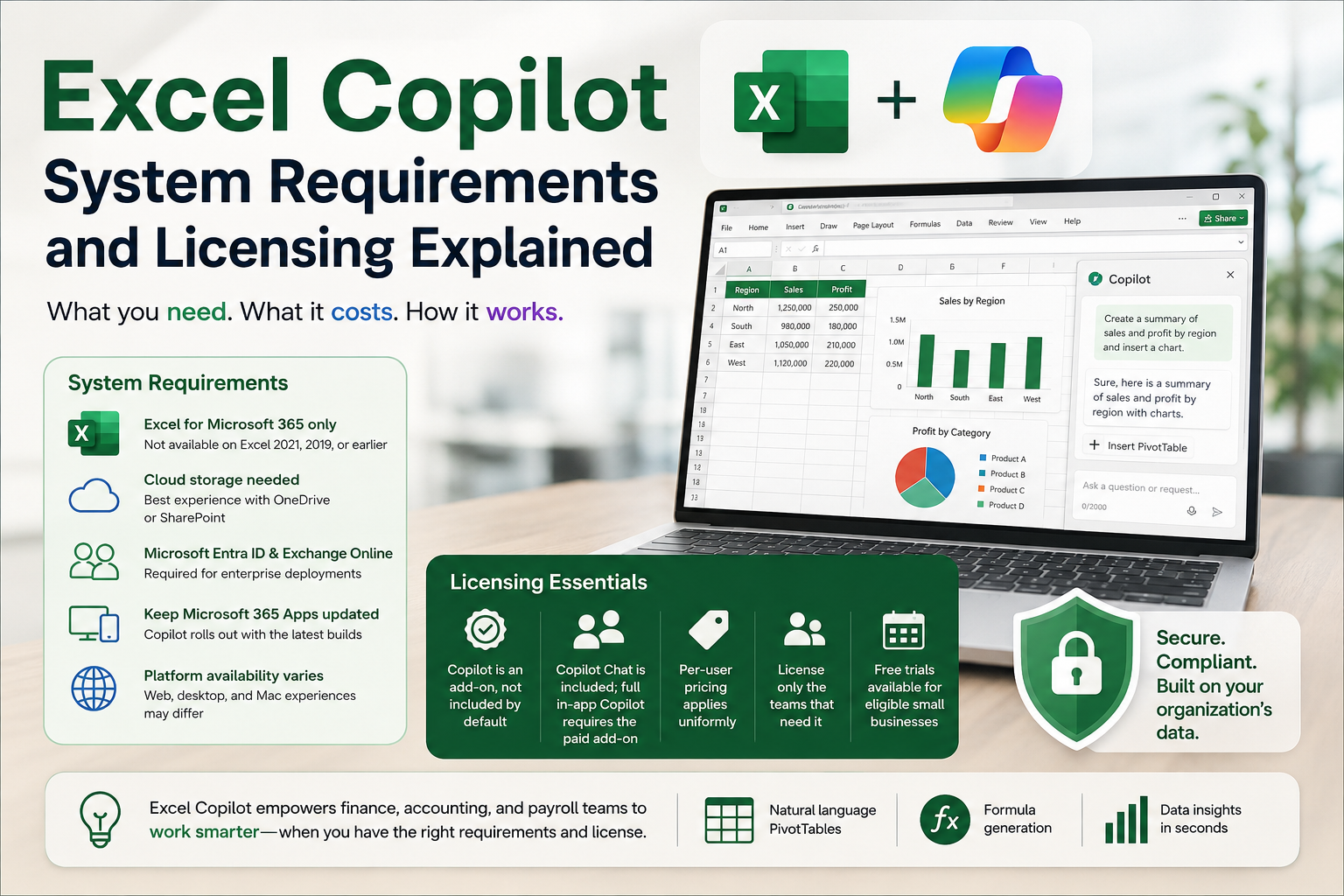
Excel copilot has quickly become one of the most talked-about additions to Microsoft 365, promising to turn natural language questions into PivotTables, formulas, and data insights. But before finance, accounting, and payroll professionals can put it to work, there's a practical question that trips up most organizations: what does it actually take to get Excel Copilot running, and who has to pay for it?
Unlike older Excel AI features such as Flash Fill, Analyze Data, or Power Query's Column From Example — all of which have shipped with Excel for years at no extra cost — Excel Copilot sits behind a distinct licensing wall and a specific set of technical prerequisites. Understanding both is essential before rolling it out to a team.
System Requirements for Excel Copilot
Excel Copilot is not a standalone product. It's a feature layered on top of Excel for Microsoft 365, which means it inherits the requirements of that subscription-based version of Excel. A few points matter most for IT and finance teams planning a rollout:
Excel for Microsoft 365 only. Copilot features do not extend to perpetually licensed versions of Excel, such as Excel 2021, 2019, or 2016. Those versions have fixed year numbers and don't receive ongoing feature updates, so Copilot's continuously evolving capabilities simply aren't available there.
Current builds matter. Because Copilot functionality rolls out in waves, teams on older builds of Microsoft 365 Apps may see the feature appear later than colleagues on updated channels. Keeping Microsoft 365 Apps current is part of staying Copilot-ready.
Cloud-based file storage. Many Copilot capabilities in Excel, particularly those involving data analysis and formula generation, work best — and sometimes only work — when files are saved to OneDrive or SharePoint rather than stored locally.
Network and identity prerequisites. Organizations deploying Copilot at scale need users set up with Microsoft Entra ID accounts, and primary mailboxes hosted on Exchange Online, since Copilot's underlying architecture depends on Microsoft Graph and organizational data connections.
Platform availability varies. Some Copilot experiences appear first on the web version of Excel before reaching desktop and Mac clients, so the same license may deliver a different experience depending on which platform a user opens.
Licensing: The Part That Catches Most Teams Off Guard
This is where confusion tends to peak. Having a Microsoft 365 subscription does not automatically mean Copilot is included in Excel. Specific add-on licensing is required, and eligibility depends on the base Microsoft 365 plan already in place.
A few licensing realities worth knowing:
Copilot is an add-on, not a default. Most commercial Microsoft 365 plans do not bundle full Copilot access into Excel automatically. Organizations need to layer a separate Copilot license on top of an eligible base subscription such as Microsoft 365 Business Basic, Business Standard, Business Premium, E3, or E5.
Copilot Chat is different from full Copilot. Microsoft offers a lighter "Copilot Chat" experience included with eligible Microsoft 365 subscriptions, but the deeper in-app functionality inside Excel, Word, and PowerPoint — including agent mode that edits and builds files directly — generally requires the paid add-on license.
Per-user pricing applies. The standard Microsoft 365 Copilot add-on has been priced at a flat per-user, per-month rate that applies uniformly regardless of purchasing channel or order size, so there's little room for organizations to negotiate a lower rate.
Selective licensing is allowed. Businesses don't need to license every employee. Copilot can be assigned to specific roles or departments — for example, finance and payroll teams who benefit most from AI-assisted spreadsheet work — which helps control cost while still capturing productivity gains where they matter.
Trial options exist for smaller organizations. Microsoft has periodically opened limited free trials of Copilot Business for small and medium-sized businesses with a valid Microsoft 365 Business license, giving teams a way to test the feature before committing budget.
Academic and individual options are separate tracks. Faculty, staff, and students have their own Copilot licensing path, and Microsoft 365 Personal and Family subscribers now see Copilot-related features bundled into consumer plans as well, with the option to disable AI features if preferred.
Why This Distinction Matters for Compliance and Finance Teams
For payroll, HR, and accounting professionals who rely on Excel daily, the practical impact of licensing decisions is real. Teams that assume Copilot "just works" because they have Microsoft 365 may find the feature missing, prompting help-desk tickets and confusion when a renewal or configuration change removes access unexpectedly. Planning ahead — confirming the base subscription, budgeting for the add-on, and setting expectations with staff — avoids that disruption.
It's also worth remembering that many of the AI-powered Excel features long available to professionals, including Flash Fill, Power Query's data transformation tools, and the free Excel Labs add-in for ChatGPT access, don't require Copilot licensing at all. Teams evaluating cost against benefit should map out which tasks genuinely need Copilot's natural-language PivotTable creation and formula generation versus which can be handled with existing, no-additional-cost AI features already built into Excel.
Final Thoughts
Excel Copilot delivers real efficiency gains for professionals who spend their day building reports, reconciling data, and writing formulas. But getting there requires more than curiosity — it requires the right Excel for Microsoft 365 subscription, the correct add-on license, and infrastructure like Exchange Online and cloud file storage already in place. Organizations that map out these requirements before rollout avoid the licensing surprises that have tripped up so many teams recently, and they position their finance and HR staff to actually use the tool rather than just hear about it.
Frequently Asked Questions
Q1.Does every Microsoft 365 plan include Excel Copilot automatically?
No. Most commercial Microsoft 365 subscriptions require a separate Copilot add-on license layered on top of an eligible base plan; Copilot access is not included by default in standard subscriptions.
Q2.Can I use Excel Copilot with a perpetually licensed version of Excel, like Excel 2021?
No. Copilot features are tied to Excel for Microsoft 365, the subscription-based version that receives ongoing updates. Perpetual, year-numbered versions of Excel do not support Copilot.
Q3.Do files need to be stored in a specific location for Copilot to work in Excel?
Many Copilot capabilities function best, and sometimes only function, when workbooks are saved to OneDrive or SharePoint rather than kept on a local drive, since Copilot draws on cloud-connected data and organizational context.
Q4.Is there a way to try Excel Copilot before purchasing licenses for the whole team?
Yes, in some cases. Microsoft has offered limited-time free trials of Copilot Business for small and medium-sized organizations with an eligible Microsoft 365 Business subscription, allowing teams to test functionality before a full rollout.
Comments
Log in or sign up to join the conversation.